Saturday, April 23, 2011

y = mx + b

I had recently compiled a set of plots for a technical report I put together to summarize an evaluation of some of our software. The focus of the tests was performance of multiple file transfer approaches. One of the comments I got back after pushing the report out for review was that I should include the slope as an annotation for a best fit line I had included. I thought this was a curious request at first since the best fit was already intended to give a visual estimate of the behavior. After I thought about it, however, I considered the case when someone would want to compare results to ours without having any of our raw data. A visual estimate would certainly not do in that case - especially if the range of their data was outside of the viewable area of the plot.

This was a simple change. R, the software I was using to generate the plots, has built in functionality for linear regression. Getting the slope and y-intercept is as easy as:

> lm(y ~ x)

Call:
lm(formula = y ~ x)

Coefficients:
(Intercept)            x
   8.474523     0.007313

This got me thinking, however. Would I know how to generate the linear regression without software? The answer was 'no', so I learned how. Here are the steps I took to generate the same results as the statistical software I was using.

I was dealing with a set of data that was generated using inputs over the powers of two: [1, 2, 4, 8, ..., 2048, 4096]. I also had multiple samples at each input. The first step was to determine how, in fact, a linear regression is calculated.

Linear regression (used to make a best fit line) can be calculated using the least squares approach. I needed to have the following: mean and standard deviation of both the inputs and outputs and the Pearson product-moment correlation coefficient. Once I had all of those calculations I could generate the slope and y-intercept of the best fit line and thus any point along the line.

In order to calculate the PMCC there is some upfront legwork that I needed to do. The equation requires the standard score and sample standard deviation from the two sets and calculating the y-intercept requires the sample means. The Pearson product-moment correlation coefficient for a given sample is defined here (Wikipedia).

I put together some Ruby code to generate the necessary values:

#!/usr/bin/env ruby

class DataSet
    attr_reader :mean, :var, :sd, :size
    def initialize(ary)
        @size = ary.size
        @data = ary.dup
        @mean = ary.inject(0.0) { |sum,n| sum + n } / @size
        @var = ary.inject(0.0) { |sum,n| (n-@mean)**2 + sum }
        @sd = Math.sqrt(@var/(@size - 1))
    end

    def [](i)
        @data[i]
    end
end

# http://en.wikipedia.org/wiki/Pearson_product-moment_correlation_coefficient
def pearson(x,y)
    g = []
    x.size.times do |i|
        g << ((x[i] - x.mean)/x.sd)*((y[i] - y.mean)/y.sd)
    end
    (1.0/(x.size - 1)) * g.inject(0.0) { |sum,n| sum + n }
end

#http://www.stat.wmich.edu/s216/book/node126.html
def slope(x,y)
    pearson(x,y) * (x.sd/y.sd)
end

def intercept(x,y)
    x.mean - slope(x, y)*y.mean
end

def load_data(file)
    xs, ys = [], []
    if file
        File.open(file).each do |line|
            x,y,_ = line.chomp.split(',')
            xs << x.to_f
            ys << y.to_f
        end
    else
        while line = gets
            x,y,_ = line.chomp.split(',')
            xs << x.to_f
            ys << y.to_f
        end
    end
    [DataSet.new(xs), DataSet.new(ys)]
end

x, y = load_data(ARGV.shift)

puts "Slope      : %0.6f" % [slope y, x]
puts "Y-intercept: %0.6f" % [intercept y, x]

Running that with my control data set yields the following:

Slope      : 0.007313
Y-intercept: 8.474523

With the results from R above as a sanity check these values look accurate. Now, using these calculations, I could plot a best fit simply by drawing a line from (1,y) to (4096,y) where y is calculated using the equation: y = mx + b.


So, while I'm still an advocate of using the right tool for the job I can now understand the mechanics behind these calculations and talk specifically about why they should (or should not) be used.


N.B. I am no expert on any of this. There are topics at play here I do not fully understand (details of the Pearson product-moment correlation coefficient, for one). This is more a narrative than any official guide to understanding.

Wednesday, April 13, 2011

Dynamic Code Loading (in C)

Originally, I intended to write this post about function pointers in C. I was inspired (yet again) by activity in a forum where a user asked a question about why you would ever need to use function pointers. As I started thinking about mapping the idea to a useful example I kept considering how the kernel uses function pointers for module writers. Couple that with my new exploration into the Erlang programming language and you get this content instead.

To address the first point directly: function pointers are useful as a means to expose a standard set of functionality. Consider how a character device driver for the linux kernel operates, for instance. When you write a character device driver you are presented with a struct file_operations (fops).

struct file_operations {
   struct module *owner;
   loff_t (*llseek) (struct file *, loff_t, int);
   ssize_t (*read) (struct file *, char *, size_t, loff_t *);
   ssize_t (*write) (struct file *, const char *, size_t, loff_t *);
   int (*readdir) (struct file *, void *, filldir_t);
   /* ... lots of other calls ... */
};

Why? Consider what you do with a character device; read from it, write to it, and so on. But since each device requires it's own implementation there needs to be a way to indicate this within the module code.

One solution to this is to have a set of skeleton functions declared in a header file. Require that all modules include this file and provide definitions for the functions. There are two obvious drawbacks to this approach:
  • Module writers are forced to fill in an empty body for all functions that will not be used
  • Any changes to the interface require reimplementation of the entire set of modules using the now outdated file
A consequence of the second problem is that any interface must be absolute before release and must not support subsequent updates.

Another solution is to use a structure that contains function pointers and allow developers to use that when writing to the interface. This solves the two issues with the skeleton declaration approach: any function not defined is set to nil in the structure and adding new members to the structure wont break existing code. Ok... if there is some fancy offset calculation being done there is potential for breakage, but that is suspect behavior in the first place.

Obviously removing entries creates compatibility issues in either solution.

Here is how the function pointer approach works in the linux kernel:

/* linux-2.6.37/drivers/i2c/i2c-dev.c:513 */

static const struct file_operations i2cdev_fops = {
    .owner      = THIS_MODULE,
    .llseek     = no_llseek,
    .read       = i2cdev_read,
    .write      = i2cdev_write,
    .unlocked_ioctl = i2cdev_ioctl,
    .open       = i2cdev_open,
    .release    = i2cdev_release,
};

Where each of the i2cdev_* functions are defined locally to that file and any operations not defined in the struct are nil (aio_fsynch, for example).

That actually represents dynamic code loading in it's entirety. You can change the behavior of a system by loading modules at runtime. But that is in the kernel and not applicable in userland; what if we wanted to do that for a process we control? That is something that Erlang lets you do and - because I'm bent on reinventing the wheel for experience - I wanted to do it in C as well. Note: I'm sure that Erlang is not the only language that supports this; it just happens to be what I was reading recently.

Lets start with the interface that is exposed:

#ifndef JRB_DYNOPS__H__
#define JRB_DYNOPS__H__

/*
 * Operations supported by our dynamic runtime:
 *  init: Initialize the new code
 *  speak: process strings in some way
 *  destroy: Cleanup code
 */
struct dynops {
    void (*init)();
    void (*speak)(const char *);
    void (*destroy)();
};

/*
 * Fill in the opeartions for a particular implementation
 */
void get_ops (struct dynops *);

#endif /*JRB_DYNOPS__H__*/

And two clients writing to that interface:

Client 1

#include <stdio.h>
#include <string.h>
#include "dynops.h"

static void lib1_speak (const char * text) {
    fprintf (stderr, "[LIB1] %s\n", text);
}

/* only implements speak. Ignores init & destroy */
static struct dynops my_ops = {
    .speak = lib1_speak,
};

void get_ops (struct dynops ** ops) {
    memcpy(*ops,&my_ops,sizeof(my_ops));
}

Client 2

#include <stdio.h>
#include <string.h>
#include "dynops.h"

static void lib2_init () {
    fprintf (stderr, "Initializing lib2\n");
}
static void lib2_destroy () {
    fprintf (stderr, "Cleanup lib2\n");
}
static void lib2_speak (const char * text) {
    fprintf (stderr, "[LIB2] %s\n", text);
}

static struct dynops my_ops =  {
    .init = lib2_init,
    .speak = lib2_speak,
    .destroy = lib2_destroy,
};

void get_ops (struct dynops ** ops) {
    memcpy(*ops,&my_ops,sizeof(my_ops));
}

This driver is relatively crude. Notification of code change come by way of a signal and a well-known path indicates where the code resides. In addition, the mechanism for copying the structure of function pointers should reside in the driver itself and not in the clients. I think it is sufficient, however, to convey the idea.

int main () {

    unsigned long count = 0;
    char iteration[255] = {0};
    signal (SIGUSR1, trigger_load);

    while (1) {
        snprintf (iteration, 255, "Iteration: %lu\n", ++count);
        do_ops (iteration);
        usleep (500000);
    }

    return 0;
}

And some implementation

void trigger_load (int sig) {
    if (sig != SIGUSR1)
        return;
    FILE * new_lib = fopen("/tmp/dynlib", "r");
    if (! new_lib)
        return;
    fscanf (new_lib, "%s", lib_name);
    fclose (new_lib);
    the_lib = lib_name;
    reload = 1;
}

/* ... */

void do_ops (const char * str) {
    if (reload) {
        load_lib (the_lib);
        reload = 0;
    }
    if (ops.speak)
        ops.speak(str);
}

With that setup we can now control the behavior of that driver at runtime. The example here runs the driver in it's own terminal and in another terminal commands are executed to load new code. The table below shows the execution in sequence - dynamic code execution in C.

Terminal 1
$ ./a.out


'libops1.so' successfully loaded
[LIB1] Iteration: 40
...
[LIB1] Iteration: 52


'libops2.so' successfully loaded
Initializing lib2
[LIB2] Iteration: 53
...
[LIB2] Iteration: 62


Cleanup lib2
'libops1.so' successfully loaded
[LIB1] Iteration: 63
...
Terminal 2

$ pgrep a.out
5993
$ echo "libops1.so" > /tmp/dynlib
$ kill -10 5993


$ echo "libops2.so" > /tmp/dynlib
$ kill -10 5993


$ echo "libops1.so" > /tmp/dynlib
$ kill -10 5993


Work Ethic

I do something every day at work, something I've done since my first day; I keep details about all things related to hours worked. Mostly this stems from having to manage working 3 or more programs while still billing appropriately for each accurate to the one-half hour. I'll admit that I've also got a slight tendency toward obsessive compulsiveness for some things.

In either case, I decided to take a look back over the past three years to see how my behavior has changed as I've become more comfortable with my surroundings and settled into a personal groove. I should mention first that I work in a very relaxed environment: jeans and t-shirt, flex hours, 24-hour access to premises and so on. This is reflected in the type of patterns that emerge here. Certainly, if I worked at a typical 9-to-5 this exercise would be moot.

Here is what the overall picture looks like[1]:


The blue points represent the times I arrive at work and the red indicates when I leave. You can see a clear pattern - especially in the start times - that is moving away from that 8:30am time. I split the start times into two groups and added a linear fit[2] to bring this out. It follows from this that there should be some split at the top but as each day is not exactly 8 hours the relationship is obviously not 1:1.

Why do the sets diverge then? It made me chuckle when I saw it because I deal with the problem every day and tire of it the more I do. See, I've got a 1-hour commute in each direction. I'm also forced to travel a particularly busy stretch of highway headed into Philadelphia to get to work. When I first started the job I was eager to impress and dealt with traffic to do so. As I've established myself I've decided to either get in early enough to avoid any traffic or wait until it is all passed before heading out. Again, not really possible in the 9-to-5 setting. I don't see actually following the projection lines; the three years have been enough for me to gauge just when to leave. The pattern has probably plateaued by now.

Since I couldn't decipher it from the above image, I also wanted to known what my average output was for the company (and if it had changed as much as my commuting habits). Here is the result: total hours worked for the same time frame shown above.

Takeaway is that I put in, on average, 9 solid hours a day. More obvious is that there is no telling how I'm going to do that over any given period. My first impression was that the hours would be high on Monday decreasing slowly to Friday where the average would be lowest (I like half-day Fridays). There was no such trend, however. In fact, the only day that had any significant difference from the others was Wednesday. I pick my daughter up from school on Wednesday so regardless of what time I get in I leave between 2:30 and 3:30. This ultimately drives down the number of hours I work on Wednesdays over time.

Nothing particularly groundbreaking. While my opinion of the work I do has fluctuated over time I can see no evidence of that in my behavior (from this data, anyway). The traffic thing was a neat find but I was disappointed to not have had more interesting trends in the distribution of hours over the week.

Still, I got to have some fun playing with R and a bit of data.


[1] In all the data presented here I've removed extreme outliers such as a stint I had working 10:00pm to 4:00am. I intended to explore my general behavior so I took some liberties with the data used in doing so.

[2] I failed Prob/Stat the first time through. Literally. I believe there is some underlying assumption about normal distribution when fitting a line which possibly makes this inaccurate as the distribution of each set of points is slightly skewed.

Thursday, March 31, 2011

The Price of Parking

I live in the Philadelphia area. If you've ever been to a Philadelphia sporting event you understand that there exists a certain kind of crazy that envelops the area just before game time and hangs around to varying degrees after the game depending on the outcome. If you are a true Philly fan you drink the crazy Kool-Aid. I don't, but my father-in-law has season tickets to the Flyers so occasionally I pretend to get a little punch drunk.

I don't live in an area that makes it feasible to take public transportation so I usually end up driving to the stadium from work. Parking is an assumed cost (as is $7 beers) but the last game I went to the price was pretty steep: $15. That is opposed to just three years earlier when I could get a spot for a mere $10. This was painful enough to force me to look at it more when I got home - and so I did.

There wasn't much to be gleaned from the fact that prices had risen over the past few years. Especially since Phildelphia built three new stadiums in the last ten years and, unfortunately, there is a blanket excuse to raise prices without cause lately: the poor economy. In either case, in thinking about all of this I started to consider how information can be used to manipulate people. More specifically, I imagined how the owner of the lot might try to explain away the increase to his (or her) customers.

As a consumer, I might approach the situation with the argument that the cost of parking has risen exponentially over the past five years. Certainly, from the following representation that might make sense:

Of course, that is presented in precisely the right way: the scale is only large enough to include the data points being shown; there is no history previous to 2007 where a consistent price may have been held (the two data points at $10 hint at this, however); and there is no comparison to other lots and/or prices in the area.                           

The counter to that point of view might look something like this:
Plenty going on here. First, and probably most important, is the scale: adjusting the scale results in a trend that appears closer to linear than exponential. Other factors: extending the range (going back to 2001); a carefully chosen cost of living number - modest, but keeps total profit negative; keeping the number of games high (it is a multiplier of the profit). In addition, the loss is not exactly negative income per patron, it is lost profit against the chosen cost of living increase.

In exploring this thought experiment I've only enforced what I already know: we, as presenters of data, have an obligation to be honest and straightforward. Data can be made to tell any convenient story; we would do well to remember that when consuming and producing information.

"The most dangerous untruths are truths moderately distorted." - Georg Lichtenberg

Incidentally, I had to leave that game early due to my daughter being very tired. On the way out I was helping my daughter put on her coat and a boy came over and asked if he could give her a puck. It seems he caught the puck during the game and wanted my daughter to have it. Well her eyes lit up and, of course, it completely made my night. Certainly worth the price of parking if you ask me.

Sunday, March 13, 2011

Disappearing Ink

This is something I've been wanting to post about for a while now. There was thread on a forum I used to frequent (under a different handle). You can follow the link for details, but the main concept was that in a transition to a GUI environment the developers needed to intercept printf and fprintf calls and do something GUI-related when the GUI was running and leave the software as-is when the GUI was not running. The approach to handle this was to define their own version of the functions and handle the context there. Something like:

extern "C" int fprintf (FILE *__restrict __stream,
       __const char *__restrict __format, ...)
{
   va_list args;
   int return_status = 0;

   va_start(args,__format);

   if (is_gui && (__stream == stdout || __stream == stderr)) {
       return_status = showMessageInGui(NULL, __format, args);
   }
   else {
       return_status = vfprintf(__stream, __format, args);
   }

   va_end(args);
   return return_status;
}

Which only worked part of the time. Complicating matters was the behavior was different across multiple compiler versions: gcc4.2.4 exhibited the problem while gcc3.4.2 did not.

I did some digging around and found out that the newer version of gcc was actually implementing a level of optimization that undermined the approach of redefining printf. Basically, any argument to printf that did not contain a format string (%) to be filled in resulted in a translation by later versions of gcc to a call to fwrite (or puts). For example:

#include <stdio.h>
int main () {
    printf ("With args %d\n", 10);
    printf ("Without\n");
    return 0;
}

Translates to

.LC0:
    .string "With args %d\n"
.LC1:
    .string "Without"
    .text
    ...
    movl    $.LC0, %edi
    movl    $0, %eax
    call    printf
    movl    $.LC1, %edi
    call    puts
    movl    $0, %eax

Notice the puts call for the second call to printf. So regardless of what definition was provided for printf the code would never be executed. Try it with the following:

#include <stdio.h>

int printf (const char * fmt, ...) { return 1/0; }

int main () {
    printf ("w00t\n");
    return 0;
}

You'll see that a warning is presented (for division by zero) but the code runs without issue.

There were several solutions presented in the thread but the OP eventually chose to use gcc flags to prevent this behavior. Using -fno-builtin-fprintf and -fno-builtin-printf allowed compilation without the translation and the redefinition of printf worked as expected.

Anatomy of an update

I recently put ntrace up on github.

While I was doing testing for that version I saw my package manager blinking at me telling me I needed updates. I decided to take that as an opportunity to test ntrace on a more realistic use case (at the time I was just doing scp or iperf tests). Instead of using the Synaptic Package Manager GUI I opened up a terminal and used aptitude to do the update. Since I know nothing about how aptitude works, this was a good opportunity to see what ntrace could tell me.

Here was the command I ran:
LD_PRELOAD=./libntrace.so aptitude safe-upgrade
The update was small; it consisted of only 5 packages:
The following packages will be upgraded:
      libmozjs1d libsvn1 subversion xulrunner-1.9 xulrunner-1.9-gnome-support
    5 packages upgraded, 0 newly installed, 0 to remove and 7 not upgraded.
    Need to get 10.4MB of archives. After unpacking 8192B will be used.
    Do you want to continue? [Y/n/?]
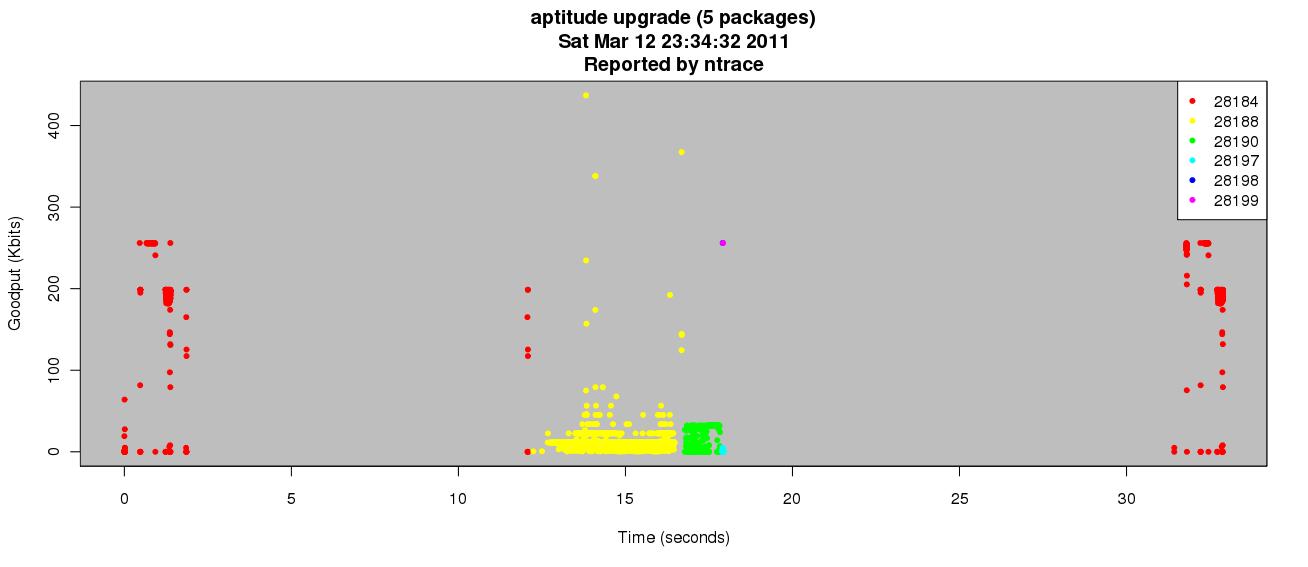
After typing Y to continue the update completed without issue. I parsed the resulting output and compiled the following graph:

Interesting points:
  • Between seconds 3 and 12 there is no activity. This is the time I was reading the screen before I confirmed and continued with the update.
  • Each package was retrieved by it's own process. The dots are color-coded according to the PID that was associated with the traffic (see the legend).
  • Packages are downloaded sequentially instead of in parallel.
  • The long delay after 17 seconds is the time it took to actually install the updates on my system. The original process then communicates some more (presumably about the status of the children) and the update exits.
  • The traffic patterns for the parent process are nearly identical at the front and back end of the communication. Maybe all details of the update are advertised at both ends instead of a diff? Dunno, but it is interesting.
This is how ntrace is useful to me: quick insight into application activity as it relates to the network.

As part of my testing I am doing performance impact analysis. Perhaps some of those details will appear here as well.

Wednesday, March 9, 2011

github

So I've finally caught up with all the hype and got myself a github account. You can find more randomness there.

Please let me know if you find anything there useful.

ezpz on github :)